Safeguard
  • Solutions
    • Hazard Detection
    • Accident Prevention
    • Emergency Response
    • Document, Analyze & Improve
  • Products
    • The COMPASS Series
    • Navigator
  • Industries
    • Utility
    • Telecom
    • Mining
    • Contractors & Construction
    • Oil & Gas
    • Arborist
  • Resources
    • All Resources
    • Technical Documents
    • Blog
    • Videos
    • White Papers
    • Contact Customer Support
  • Company
    • Why Safeguard
    • Company News
    • Careers
  • Contact Us

Companion App for Compass Series

Navigator® Mobile

Coordinated communication when every second counts.

Connect your Compass Series device to Navigator Mobile to take advantage of all its features: configure voltage and current sensitivity, manage emergency events, and coordinate response with your team. The Safeguard Navigator Mobile app is free to download from the Apple App Store and Google Play Store.


Download on the App StoreGet it on Google Play
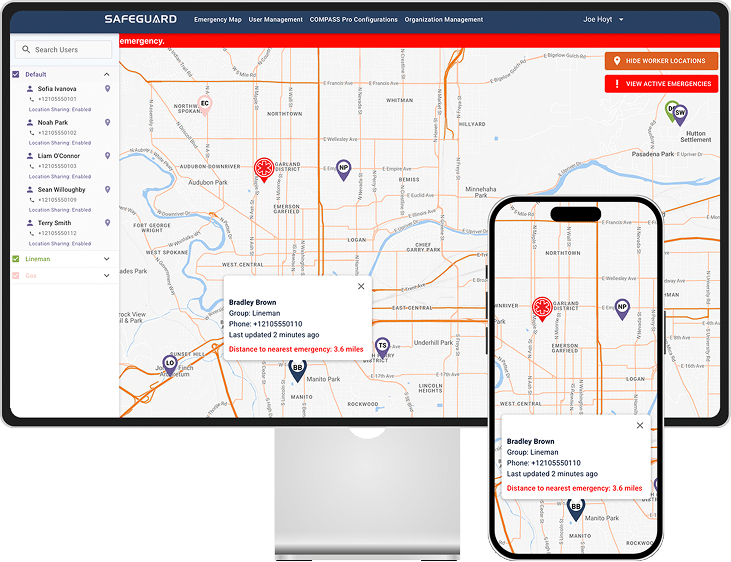
Navigator Mobile shown on a phone alongside the Navigator Console

Installation & Setup

Download the app and pair your Compass.

After downloading Navigator Mobile, follow the in-app prompts to set up and create an account profile. Then tap the Compass Pro tab, power on your Compass Series device, and hold it near your phone. Bluetooth pairing happens within seconds.

Once paired, if a firmware update is available you'll be prompted to update. It is always advised to update, as updates provide functionality improvements and new features.

↓Download the Navigator Mobile User Guide

Minimum requirements

Android
Android 7.0 or later
iOS
iOS 15.0 or later

For privacy information regarding the Navigator Mobile and Navigator Console apps, see our Privacy Policy.

What you can do

Configure your Compass. Detect incidents. Coordinate response.

Bluetooth connection

Tap the Compass Pro tab and hold your device near your phone. Pairing happens within seconds, and the Compass will display sweeping green LEDs to confirm.

Voltage & Current tabs

Set sensitivity, view the Alert Level line for each detection method, enable Smart Adaptive mode, and mute or disable alerts, all from the app.

Tools tab

Check firmware version and update when prompted, switch between selectable voltage ranges, and manage the currently connected Compass Series device.

Automatic emergency events

Navigator Mobile creates events for impact, fall, arc flash, and man-down detection, each with a 30-second countdown that can be confirmed or canceled from the app or the device.

Emergency response team

Add in-organization and external contacts from Account Settings. Responders receive critical push alerts, SMS, location context, and an in-app emergency chat.

Receive and respond to events

Critical-alert push notifications override silent mode, SMS messages and location are sent, and your Compass flashes orange/white until you check the response chat.

Emergency Events

Get more out of Navigator Mobile with a service subscription.

Most emergency event features are only available with a service subscription. Here's what's included with and without one.

FeatureNo subscriptionSubscription
Compass series voltage/current settings✓✓
Receive emergency event SMS messages✓✓
Detect and send emergency events·✓
Emergency map + chat features·✓
Receive emergency event notifications·✓
Compass series configurations & administration (via WebApp)·✓

For subscription sales or questions, please contact us at sales@safeguardequipment.com.

Get Navigator Mobile.

Free to download. Required to unlock the full feature set of your Compass Series device.

Download on the App StoreGet it on Google Play
  • Home
  • Hazard Detection
  • Accident Prevention
  • Emergency Response
  • Document, Analyze & Improve
  • Customer Return Form
  • Resources
  • Safeguard Trust Center
  • Media
  • Careers
  • Website Privacy Policy
  • Apps Privacy Policy
  • Blog
  • End User License Agreement
  • Compass Pro Limited Warranty
Phone: 208-773-9263
Corporate Office:
Safeguard Equipment, Inc.
4202 West Riverbend Ave.
Post Falls, ID 83854 USA
Safeguard Logo

Copyright © 2026 Safeguard Equipment. All rights reserved.