120 V to 500 kV, one scale
One device follows a worker from a service call to a transmission structure, with no voltage range to select.
Compass Series · CONNECTED
The full connected model. One 22-setting scale covering 120 V to 500 kV with both adaptive modes, and falls, impacts, arc flash, and SOS escalated to your response team through Navigator.
Compass Pro detects 120 V – 500 kV AC on a single sensitivity scale, with no separate voltage ranges to select.
Compass Pro is what most organizations standardize on when they want prevention and response from one device. Crews get detection in their peripheral vision; safety leaders get emergency events with location routed into Navigator instead of a phone tree.
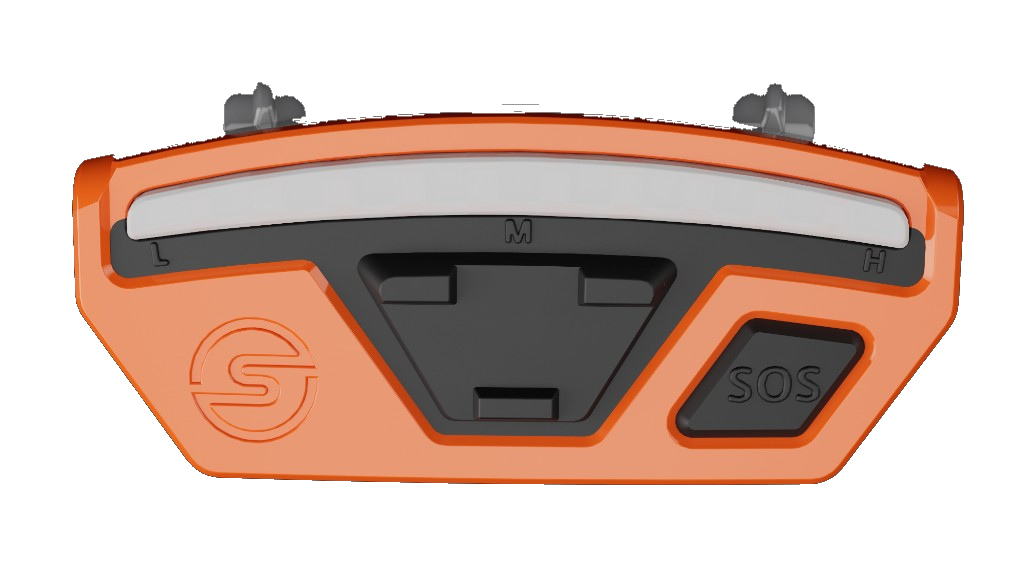
One device follows a worker from a service call to a transmission structure, with no voltage range to select.
The corner LEDs sweep toward the source, then both ends of the bar flash once the worker is facing it — accurate to roughly ±20°.
The same escalation pattern in blue across the full scale. With the handheld adapter, it also traces conductors inside walls.
Impacts, falls above 6 ft (1.8 m), and arc flash raise an event unprompted, with 30 seconds for the worker to cancel a false alarm.
Smart Adaptive and Work Zone Adaptive track the environment, so crews are not choosing between nuisance alerts and muting.
Compass Series is intended as a secondary voltage detection method only. It supplements, and never replaces, a qualified electrical safety program, permits, lockout/tagout, and PPE. Always test against a known voltage and current source before field use.
| Voltage coverage | 120 V AC – 500 kV AC |
|---|---|
| Sensitivity scale | 22 settings across the full span |
| Adaptive modes | Smart Adaptive and Work Zone Adaptive |
Detection is affected by extreme humidity, materials that shield electromagnetic fields, brisk walking speed, and three-phase systems that can cancel fields in certain areas. Warning distances also vary with the conductor’s exposed surface area, its elevation above ground, and its proximity to other grounded conductive objects.
| Enclosure | 3.0 in × 1.4 in × 0.9 in, IP-67 |
|---|---|
| Weight | 1.02 oz (29 g) |
| Operating temperature | -20 °C to 60 °C |
| Battery | Li-Po 3.7 V / 250 mAh |
| Typical battery life | ~6 days (48+ hrs) |
| Charge time | ~1.5 hours from a 5 V / 0.5 A USB source |
| Charging temperature | 0 °C to 45 °C |
| Voltage coverage | 120 V – 500 kV AC, no range selection |
| Voltage sensitivity | 22 settings, plus adaptive modes and Alert Disable |
| Current sensitivity | 22 settings, plus adaptive modes and Alert Disable |
| Adaptive modes | Smart Adaptive and Work Zone Adaptive (firmware 1.8.0.0) |
| Directional accuracy | Approximately ±20° to a point source |
| Emergency events | Impact, fall (above 6 ft / 1.8 m), arc flash, no motion, SOS |
| Connectivity | Bluetooth to Navigator Mobile |
| Mounting | Hard hat brim (primary); helmet, hot stick, wrist, and handheld adapters available |
| Part number | Description |
|---|---|
| M01012 | KIT, Compass PRO, 60 Hz |
| M01009 | KIT, Compass PRO, 50 Hz |
Compass Pro ships as a kit in 50 Hz and 60 Hz variants. Match the SKU to your grid frequency — frequency is built into the detection tuning and is not a field-changeable setting.
Hard hat brim as standard, plus non-brimmed helmet, Petzl Vertex, IDRA 2, adhesive, and SECRA-1 adapters, and hot stick, wrist, and collapsible handheld options.
Compass Pro covers 120 V AC to 500 kV AC. Following the Consolidated Range Release, that span is covered by one 22-setting sensitivity scale, so there is no longer a Low, Medium, or High voltage range to select in Navigator Mobile.
Compass Core covers the Medium voltage range only, from 2.4 kV to 34.5 kV, with two voltage sensitivity settings, one current setting, and no adaptive modes. Compass Pro covers 120 V to 500 kV on one 22-setting scale with both adaptive modes and Alert Disable. Both share the same enclosure and battery.
Voltage and current detection work without one. Emergency event communication between the Compass and the rest of the Navigator system requires an active Navigator subscription — without it the device cannot detect, send, or coordinate emergency events, though it can still receive emergency event SMS messages.
The 3.7 V / 250 mAh Li-Po cell is rated for roughly 6 days, or 48+ hours, of typical use and recharges to full in about 1.5 hours from a USB source delivering at least 5 V / 0.5 A. Battery life varies with how many alerts the device generates.
Downward impacts severe enough to cause a concussion, falls greater than 6 ft (1.8 m), and light characteristics consistent with an injury-level arc flash all create events automatically. Automatic events run a 30-second countdown the worker can cancel before the event is sent. Holding the SOS button for 3 seconds creates one manually. No motion for 60 seconds after an event elevates it to man down.
Detection at the top of the voltage span was retuned in 2025. Units identified as V4 and earlier use first-generation tuning; V5+ uses second-generation tuning with extended detection distances. Sensitivity settings themselves now mean the same thing on every generation, so the hardware version affects detection distance rather than how a setting reads. Check it on the Navigator Mobile Tools tab.
Order M01012 for 60 Hz systems and M01009 for 50 Hz systems. Grid frequency is built into the detection tuning, so it cannot be changed in the field.
Request a walkthrough and we'll show how Compass G2, Compass Core, Compass Pro, and Compass Pro IS scale from essential awareness to full connected safety in flammable environments — tailored to your crews and field conditions.
Prefer to contact us directly?
Email sales@safeguardequipment.com or call 208-773-9263.