Compass Series · Adaptive Mode
Working Next to Energized Gear Without Constant Alarms
Work Zone Adaptive sets your alert level where you stand, so the device goes back to telling you things you do not already know.
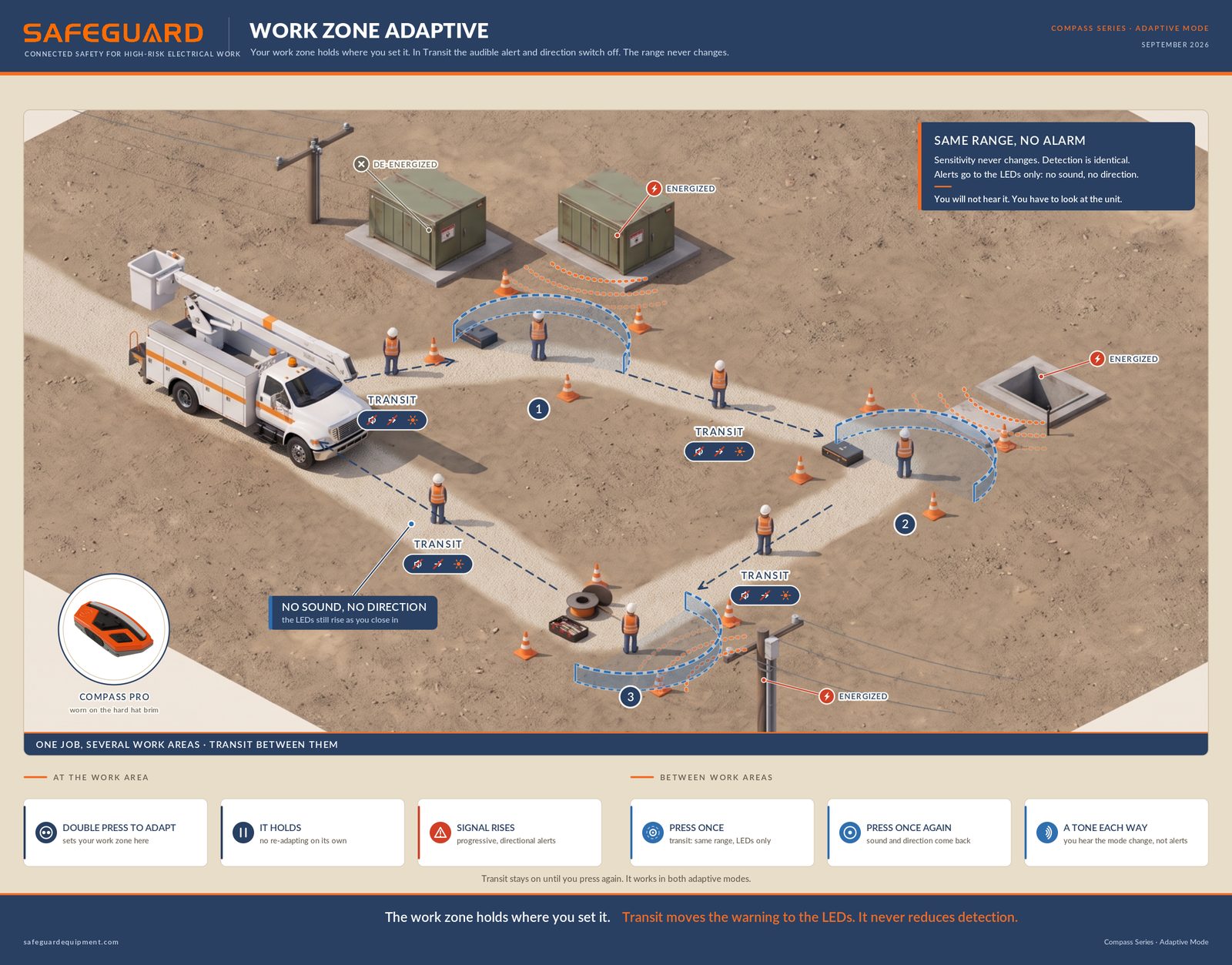
Electrical work is unforgiving, and a crew opening a pad-mount knows exactly what is behind that door. The cabinet is energized. Everyone on site knows it, and the detector on the hard hat brim knows it too, so it says so for as long as anybody is standing there.
That is the device doing what it was built to do, and it is also the device spending the morning reporting a hazard the crew walked up to on purpose. The cost shows up later. When an alert has been sounding all morning about something everyone knows about, the one that means something just changed sounds exactly like the rest.
The Usual Fix, and What It Costs
Most crews solve this the direct way. Turn the sensitivity down, or turn the alerts off, and get through the job.
Both work, and both share a flaw that is easy to miss in the moment: a sensitivity setting is not local. It applies to everything the device might encounter, not just the cabinet you are standing beside. Turn it down here and it is still down at the riser pole on the way out, still down at the next job, until somebody remembers to put it back.
Set a Work Zone Instead
Work Zone Adaptive removes that trade. Rather than changing how sensitive the device is everywhere, it changes what the device treats as normal here.
Double press the Adapt button. The device reads the field where the worker is standing and sets the work zone at that level, waiting 1.5 seconds after the press so hands are clear of the unit by the time it reads.
From there it holds. Work Zone Adaptive does not re-adapt on its own:
- If the signal rises above that level, the device alerts. The alert is progressive and directional, so a worker gets both proximity and a bearing.
- If the field drops, nothing happens. The work zone stays where it was put.
The alarm goes back to meaning something. It fires because the field went up, not because the crew is still standing where it was an hour ago.
What About Walking Between Work Areas?
A job rarely stays in one spot. The work moves to a vault across the yard, and the route passes equipment that is not part of today's job. A single press puts the device in Transit, and it works in both adaptive modes.
Same Range, No Audible Alert
Detection does not change. Sensitivity in Transit is identical to sensitivity outside it, so the device turns nothing down and switches nothing off.
The audible alert and the direction indicator switch off. The LEDs keep alerting, and they still rise as a worker closes in.
You will not hear it. You have to look at the unit.
Transit stays on until you press again. One press in and one press again out, and it does not end when you arrive.
A tone sounds going in and coming out, and that tone is the mode change rather than an alert.
Both of those lines belong in every tailgate talk. A worker who presses once, reaches the vault, and forgets to press again is standing in a live work area with no audible warning, relying on a light nobody is looking at.
Three Things Crews Ask Next
- Does the button still mute? Only with adaptive off for both voltage and current. Adaptive is set per signal type, so the button adapts whenever either one is in an adaptive mode.
- Who decides how far it can adapt? An administrator. Adaptive limits are set in the web app only, not on the device and not in the mobile app.
- What if the work does not stay in one place? Smart Adaptive tracks continuously in both directions instead of holding, which suits a worker covering ground all shift.
What Has To Happen Before Any of This Is Live
Three things matter more here than anything above.
- Adaptive is off by default. A device nobody configures after the update runs a conventional fixed setting, and the button mutes as it always has.
- Nothing changes until it connects. The update reaches a unit through the Navigator Mobile app, so a fleet moves at the speed of its connect plan, not on a date.
- It is one required update, 1.7.0.0 to 1.8.3.0. There is no optional second build.
The full release notes cover every change in 1.8.3.0.
There is also a customer webinar on Wednesday, September 30, at 8:00 AM and 1:00 PM PT, with a live walkthrough of the button. Register for the customer webinar.
Every Safe Return Home is a Promise Kept.