Overview
Compass Pro Configurations are admin-defined templates that dictate which settings a user can select for their Compass Series device. Configurations are created, edited, and applied to users from Navigator Console.
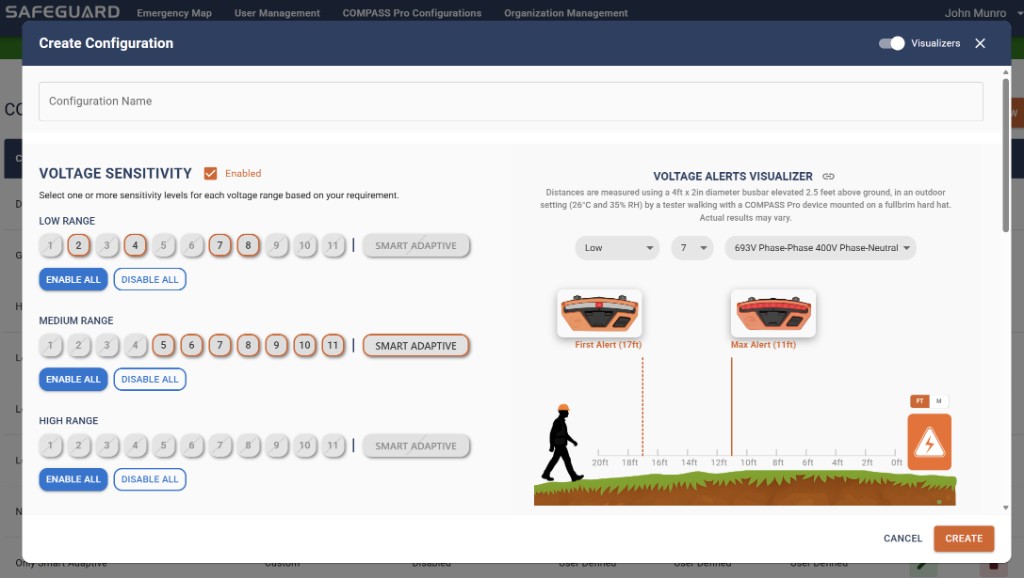
Fields in a configuration
Configuration name
Any name you choose. The "Default" configuration is the base configuration applied to users when they first sign up — it is fully configurable but cannot be deleted.
Voltage Sensitivity / Current Sensitivity
Selection options: voltage settings 1 to 22, current settings 1 to 11, Work Zone Adaptive, Smart Adaptive, and Disabled. Any selected value allows the user to select that value in Navigator Mobile; unselected options are restricted. Selecting only one value locks the device to that single setting.
Impact Alerts / Fall Detection / Arc Flash
Selection options: Unlocked, Enabled, or Disabled. Unlocked allows the user to select their own setting. Enabled and Disabled restrict the user's Compass to the specified state.
Alerts Visualizer
When editing a configuration, the highlighted sensitivities are the ones available to the Compass user. The Alerts Visualizer tool provides an approximate visualization of alert behavior for selected voltage and current sensitivity levels under a specific test scenario. See the Compass Series User Guide for the underlying detection-distance plots.
Apply a configuration
- Create or open the configuration in Console.
- Set sensitivity selections, adaptive mode availability, and Impact / Fall / Arc Flash policy.
- Assign the configuration to the target users on the User Management page.
- Watch the Configuration Status column — it shows "Unconfirmed" until the user acknowledges the change on Mobile.
Safe change process
- Confirm target devices are Compass Pro or Compass Pro IS — Compass Core does not consume these configurations the same way.
- Snapshot existing values before edits (screenshots or exports where permitted).
- Apply changes in planned windows; notify affected crews.
- Track the Confirmed / Unconfirmed column until acknowledgments roll in.
- Validate outcomes with supervised field checks — avoid improvising energized verification.